Table of Contents
When conducting Exploratory Data Analysis (EDA) using Python, the Seaborn library stands out as the definitive tool for creating complex and statistically meaningful graphics. Within this framework, a crucial feature for multivariate analysis is the pairplot() function. This function automatically generates a matrix that effectively maps out the pairwise relationships existing between all variables in a given dataset.
While standard visualizations reveal overall trends, they often fail to capture the nuance required when dealing with complex data structures containing identifiable subgroups. To maximize the effectiveness of data visualization, analysts must possess a method to visually isolate these subgroups within the plot. This capability is delivered by the hue parameter in Seaborn’s pairplot(). By leveraging hue, you introduce a powerful categorical dimension, allowing for the instant, visual comparison of relationships and distributions based on the values of a specific grouping variable.
This comprehensive tutorial serves as your guide to mastering the application of the hue parameter within pairplot(). We will demonstrate precisely how this feature elevates basic plots into sophisticated comparative analyses, enabling you to derive profound visual insights into correlations, patterns, and distributional differences across distinct segments of your data.
Syntax and Implementation of the hue Parameter
Integrating the hue parameter into your pairplot() call is straightforward and highly efficient. This parameter requires a string argument that specifies the name of the column in your dataset containing the categorical variable—the variable that will be used to color-code the data points throughout the visualization matrix.
import seaborn as sns

sns.pairplot(data=df, hue='team')
In the standard Python snippet above, df denotes the input Pandas DataFrame, and 'team' is the specified column used for segmentation. The pairplot() function automatically iterates through all available numerical variables in the DataFrame to produce the comprehensive matrix of plots. The critical mechanical transformation is that every element—from the individual points in the scatterplots to the distribution curves—is distinctly shaded according to the unique values present in the specified hue column.
This coloring mechanism ensures instant visual differentiation. If, for instance, the 'team' column holds categories such as ‘Alpha’ and ‘Beta’, the function assigns a unique color to all data points belonging to ‘Alpha’ and another to ‘Beta’. This simplifies the comparison process, allowing analysts to quickly identify unique performance profiles, inherent group differences, and similarities across all bivariate and univariate plots generated by the visualization.
Practical Demonstration: Enhancing Visuals with hue
To truly grasp the analytical value of the hue parameter, a concrete, step-by-step example is necessary. We will begin by creating a synthetic dataset designed for comparison, and then proceed to visualize the data relationships in two distinct phases: first, establishing a baseline plot without hue, and second, activating the parameter. This side-by-side comparison will vividly illustrate the feature’s capability to enrich the statistical graphics and deepen interpretation.
The goal of this demonstration is to show how a simple modification—specifying a categorical variable for color-coding—transforms an aggregate visualization into a segmented plot. This transformation is essential for moving beyond general correlation detection toward discovering crucial, group-specific patterns that are often obscured within averaged data views.
Setting Up Our Data: Creating the Performance Metrics DataFrame
For this practical illustration, we will simulate performance metrics for basketball players divided into two competing teams: ‘A’ and ‘B’. This data must be organized within a Pandas DataFrame, which is the industry standard tabular structure for data manipulation and analysis in the Python ecosystem.
Our DataFrame will consist of three essential columns: the player’s team affiliation (our grouping or categorical variable), their accumulated assists, and their total points scored (our primary numerical variables). This structure is ideal for showcasing how the hue parameter can be used to distinguish performance profiles between the two competing teams in the visualization.
import pandas as pd

#create DataFrame
df = pd.DataFrame({'team': ['A', 'A', 'A', 'A', 'A', 'B', 'B', 'B', 'B', 'B'],
                   'assists': [3, 4, 4, 7, 9, 6, 7, 8, 10, 12],
                   'points': [5, 6, 9, 12, 15, 5, 10, 13, 13, 19]})

#view DataFrame
print(df)

  team  assists  points
0    A        3       5
1    A        4       6
2    A        4       9
3    A        7      12
4    A        9      15
5    B        6       5
6    B        7      10
7    B        8      13
8    B       10      13
9    B       12      19
The resulting DataFrame, named df, contains ten player records. Each record is clearly defined by their team membership along with their quantitative performance in both assists and points. This clean, labeled dataset provides the perfect basis for demonstrating how pairplot() visualizes the relationships between the numerical columns, and, more importantly, how the hue parameter segments these visual relationships according to the 'team' column.
Visualizing Without hue: Establishing the Aggregate Baseline
Before implementing the group segmentation feature, our first step involves generating a standard pairplot() using the df DataFrame. This foundational plot establishes a crucial baseline visualization, displaying the aggregate relationships among the numerical variables without any inherent distinction between the teams. By default, Seaborn’s pairplot() intelligently identifies all quantitative columns within the provided Pandas DataFrame and produces all possible pairwise graphical representations.
import seaborn as sns

#create pairplot
sns.pairplot(data=df)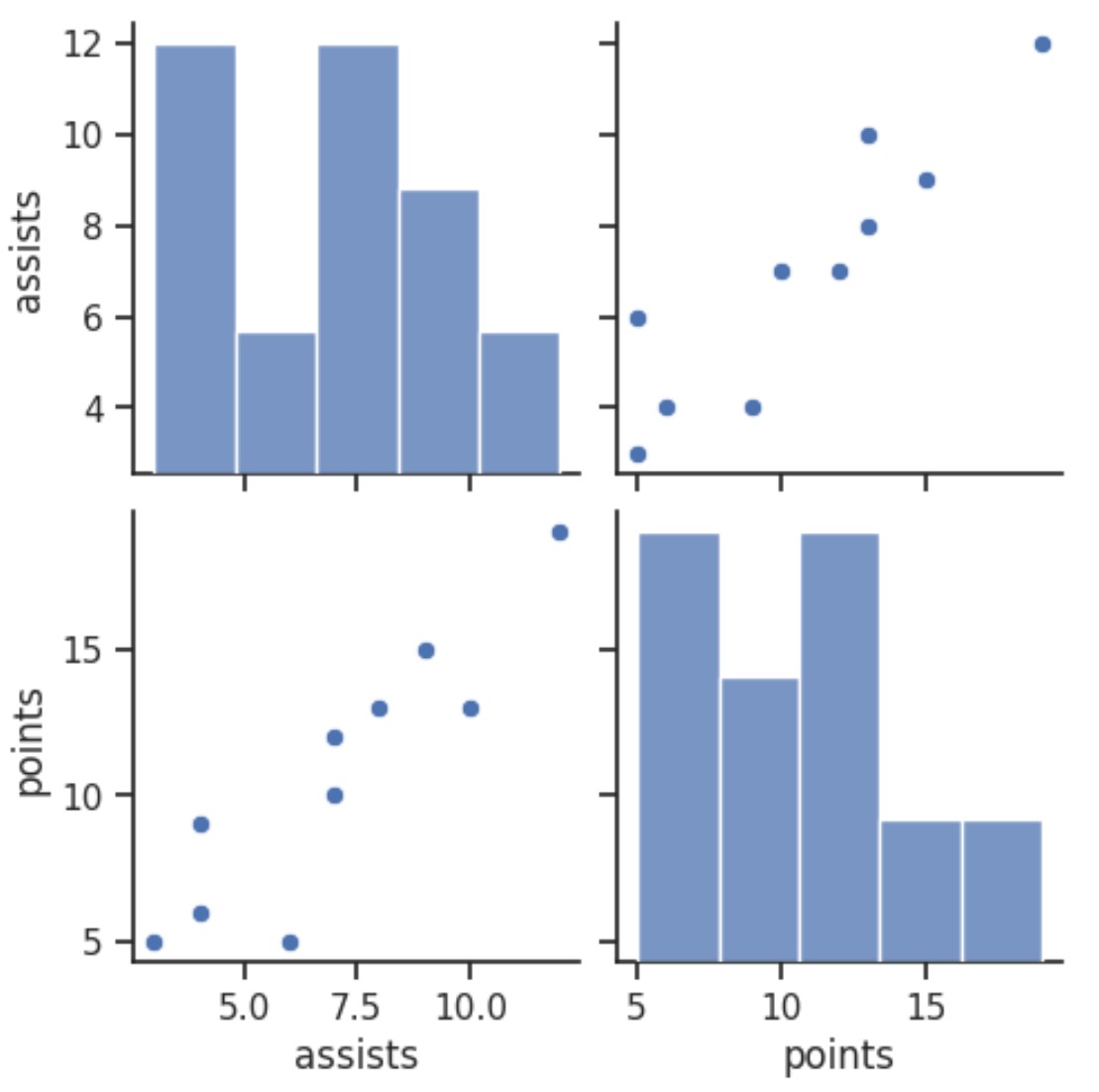
The generated grid comprises two main categories of statistical plots:
Off-Diagonal Plots: These panels feature scatterplots, which are essential for visualizing the bivariate relationship between two distinct numerical variables (e.g., the relationship between ‘assists’ and ‘points’). Every dot in the plot represents an individual player, mapped according to their combined performance scores for the two variables.
Diagonal Plots: The diagonal panels contain histograms, which illustrate the univariate distribution of each numerical variable (‘assists’ and ‘points’). These plots offer immediate insight into the frequency distribution and central tendency of values for a single column across the entire aggregated dataset.
While this baseline visualization successfully confirms overarching trends—such as the clear positive correlation between assists and points—it crucially merges all data points. Because the data is aggregated, any specific performance patterns or subtle differences attributable to Team A or Team B are lost in the overall view, rendering it impossible to conduct a meaningful assessment of group-specific dynamics or heterogeneity.
Activating Segmentation: Visualization with the hue Parameter
We now proceed to re-generate the visualization, this time incorporating the critical hue parameter and assigning it our chosen categorical variable, 'team'. This singular, straightforward adjustment fundamentally changes the analytical power of the plot, enabling us to visually separate and compare the performance metrics of the two teams directly within the graphical space.
import seaborn as sns

#create pairplot using values of team variable as colors
sns.pairplot(data=df, hue='team')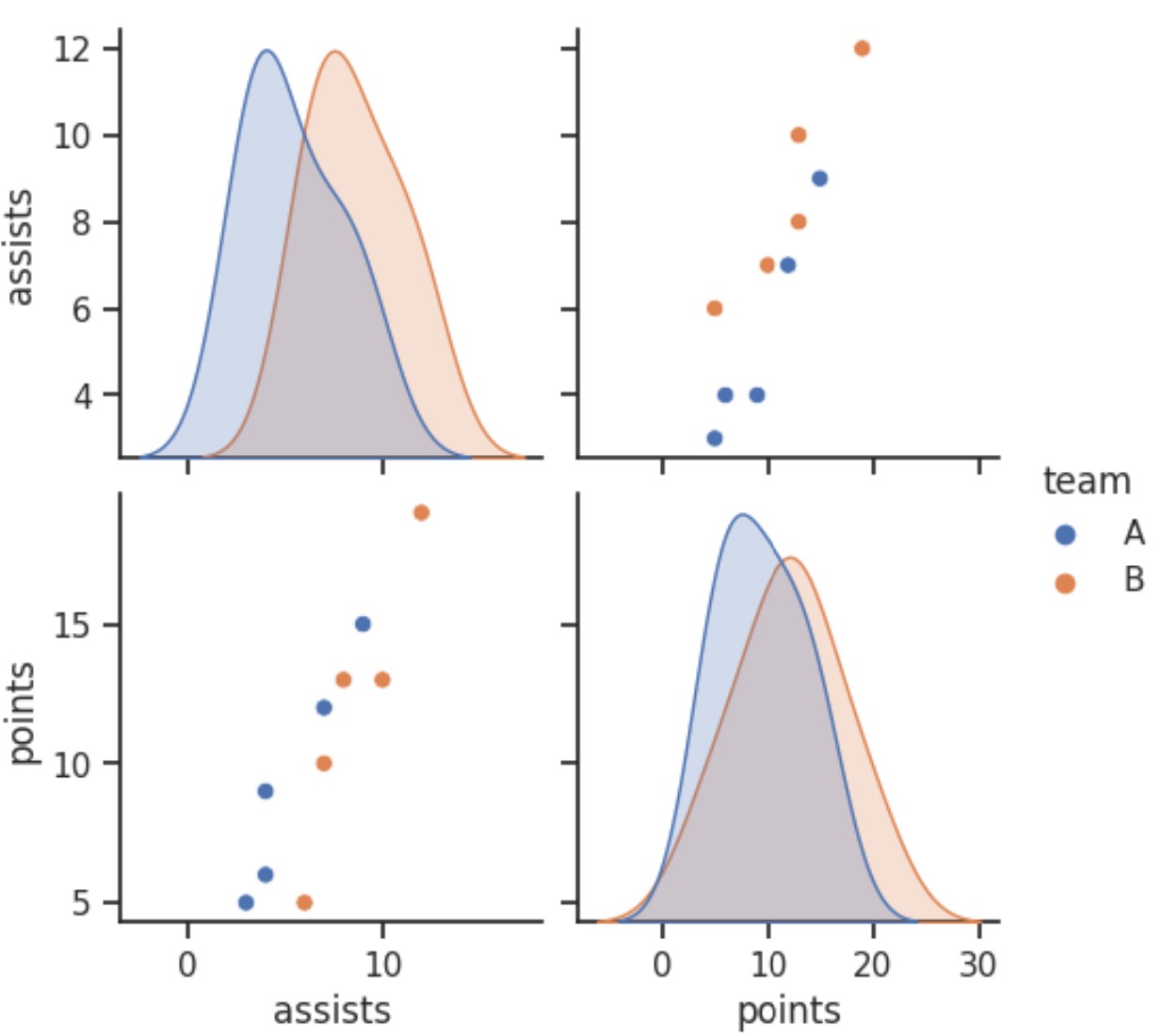
The resulting pairplot, significantly enhanced by the hue parameter, provides a much richer visual narrative, immediately underscoring key distinctions between the defined groups:
Bivariate Scatterplots: In the off-diagonal plots, every data point is now assigned a color corresponding to its team affiliation (Team A or Team B). This explicit visual separation allows analysts to determine whether the correlation observed between ‘assists’ and ‘points’ holds equally for both teams. We can effortlessly identify distinct clusters, shifts in slope, or unique trends, confirming that the performance profiles of the two teams are indeed segregated.
Univariate Distribution Plots: On the diagonal axis, Seaborn automatically adapts the display format, shifting from aggregate histograms to layered Kernel Density Estimates (KDEs). These smooth curves represent the density distribution for each unique value of the
huevariable individually. The overlaid KDEs enable a direct and powerful comparison of how the distribution of metrics like ‘assists’ or ‘points’ differs between Team A and Team B, immediately highlighting disparities in central tendency or variance.
Interpreting the Enhanced Visualization and Subgroup Dynamics
The capacity to segment data visually using the hue parameter is foundational for sophisticated Exploratory Data Analysis (EDA). This technique shifts our focus beyond global data descriptions to actively comparing and contrasting the internal dynamics present within specific subgroups. Understanding how to interpret the visual cues generated by our enhanced pairplot() is crucial for extracting actionable insights.
When examining the bivariate scatterplots, the segregated colors allow us to determine if the general positive correlation observed in the baseline plot applies uniformly to both Team A and Team B. For instance, if the cluster of Team A’s points lies distinctly higher on the vertical axis compared to Team B’s cluster at a similar level of assists, this visual separation strongly suggests a difference in underlying factors, such as scoring efficiency or tactical playing style. Similarly, comparing the tightness of the clusters reveals differences in consistency: a tightly grouped cluster suggests highly reliable performance within that team, whereas a broadly scattered cluster indicates greater variance among players.
The overlaid KDEs on the diagonal plots offer unparalleled clarity into the marginal distributions. If the KDE curve representing Team B’s ‘points’ is visibly shifted to the right relative to Team A’s curve, we can immediately conclude that Team B players collectively achieve higher scores. Furthermore, variations in the spread or modality (e.g., bimodal vs. unimodal distribution) of the KDEs can signal deeper structural differences: a bimodal distribution might suggest two distinct player roles within one team, whereas a tight, unimodal distribution indicates a homogeneous group of average performers. This ability to perform granular, group-level comparison constitutes the primary analytical strength derived from employing the hue parameter.
Core Benefits and Essential Best Practices for Using hue
The hue parameter functions as a critical analytical tool, significantly accelerating the depth of insights derived from your Seaborn visualizations. Its fundamental advantage lies in its ability to seamlessly integrate comparative analysis by leveraging a categorical dimension to segment the data visually. This feature transforms routine plotting into advanced comparative diagnostics.
The key advantages of implementing the hue parameter include:
Enhancing Comparative Analysis: The parameter instantly distinguishes between different groups, making it straightforward to compare distributions, relationships, and trends specific to each category.
Uncovering Hidden Subgroup Trends: Statistical patterns, anomalies, or inconsistencies that are typically masked or neutralized within an aggregated view become immediately apparent and strikingly visible when the data is partitioned by a meaningful grouping variable.
Boosting Interpretability and Accessibility: By clearly color-coding data points and distributions, the resulting plots become highly intuitive. This improved clarity allows a broader audience, including stakeholders without specialized statistical knowledge, to quickly grasp the significance and implications of group differences.
Streamlining Exploratory Data Analysis: It empowers analysts to efficiently validate or disprove hypotheses regarding group heterogeneity, making the entire EDA process more focused, targeted, and ultimately productive.
To maximize the analytical effectiveness and visual clarity of the hue parameter in your data projects, adherence to the following best practices is strongly recommended:
Ensure Variable Relevance: Always verify that the variable selected for
hueis analytically relevant to the research question. You should have a predefined, reasonable hypothesis that this variable exerts an influence on the observed outcomes or relationships being visualized.Limit Category Count: For optimal readability and to prevent visual clutter, it is essential to use a
huevariable that contains a limited number of unique values (ideally fewer than 10). Excessive categories can lead to overlapping data points, confusing color schemes, and diminished ability to distinguish groups effectively.Strategic Color Palette Selection: Seaborn offers sophisticated options for managing color palettes. Choose a qualitative palette that guarantees strong, distinct contrast between categories, ensuring the visual separation achieved is as clear and impactful as the underlying analytical separation.
Conclusion: The Power of Segmentation in Data Visualization
In summary, the hue parameter within Seaborn’s pairplot() function should be viewed not merely as a cosmetic coloring option, but as a critical analytical mechanism. By facilitating the segmentation of data points based on a specified categorical variable, this feature fundamentally transforms basic visualizations into high-impact instruments for deep, comparative analysis. This segmentation capability is essential for revealing distinct patterns, distributions, and relationships across various subgroups that are inevitably obscured when data is presented in an aggregated, undifferentiated view.
Regardless of the domain—whether comparing product adoption across demographic segments, evaluating experimental outcomes between control and treatment groups, or analyzing detailed performance metrics across competing teams—the hue parameter offers an immediate, intuitive, and remarkably effective pathway to actionable insights. Truly mastering its application is foundational for conducting sophisticated and informative exploratory data analysis (EDA) and producing compelling, professional data visualizations.
For comprehensive details on all available settings and advanced customization techniques, we highly recommend consulting the official Seaborn pairplot() documentation, which serves as the definitive resource.
Additional Resources
To continue building your expertise with Seaborn and explore other common data visualization techniques, you may find these related tutorials beneficial:
Cite this article
Mohammed looti (2025). Seaborn Pairplot Tutorial: Visualize Data Relationships with Hue for Exploratory Data Analysis. PSYCHOLOGICAL STATISTICS. Retrieved from https://statistics.arabpsychology.com/seaborn-use-hue-parameter-in-pairplot/
Mohammed looti. "Seaborn Pairplot Tutorial: Visualize Data Relationships with Hue for Exploratory Data Analysis." PSYCHOLOGICAL STATISTICS, 15 Nov. 2025, https://statistics.arabpsychology.com/seaborn-use-hue-parameter-in-pairplot/.
Mohammed looti. "Seaborn Pairplot Tutorial: Visualize Data Relationships with Hue for Exploratory Data Analysis." PSYCHOLOGICAL STATISTICS, 2025. https://statistics.arabpsychology.com/seaborn-use-hue-parameter-in-pairplot/.
Mohammed looti (2025) 'Seaborn Pairplot Tutorial: Visualize Data Relationships with Hue for Exploratory Data Analysis', PSYCHOLOGICAL STATISTICS. Available at: https://statistics.arabpsychology.com/seaborn-use-hue-parameter-in-pairplot/.
[1] Mohammed looti, "Seaborn Pairplot Tutorial: Visualize Data Relationships with Hue for Exploratory Data Analysis," PSYCHOLOGICAL STATISTICS, vol. X, no. Y, ص Z-Z, November, 2025.
Mohammed looti. Seaborn Pairplot Tutorial: Visualize Data Relationships with Hue for Exploratory Data Analysis. PSYCHOLOGICAL STATISTICS. 2025;vol(issue):pages.